Robin

A cowork for the creative apps on your Mac.

Robin works in the apps you already have — Blender, Unity, Godot, a video timeline, your own Chrome — beside one conversation. It checks what it made before it calls it done, and it only looks until you let it act.

  • Any model.
  • No account.
  • Pay once.
One email when Robin is ready. Nothing else.

Launching at $39. For macOS 15 or later.

Robin's sound bench: a waveform with a 1.6 second stretch selected in red, and three takes below it named Original, Make the middle warmer, and Add a tail.
The sound bench, three takes in. “Make the middle warmer”, then “add a tail”; the red stretch is what changed. Every picture on this page is a frame the app drew of itself.

What working with it looks like

Four moments, each one a real frame from the app.

Ask from whatever app you are in

Select something, press the hotkey, and Robin answers over the app you were using. Insert puts the answer back where the selection was, and one ⌘Z takes it out again.

The footer names the app the selection came from and the model about to answer.
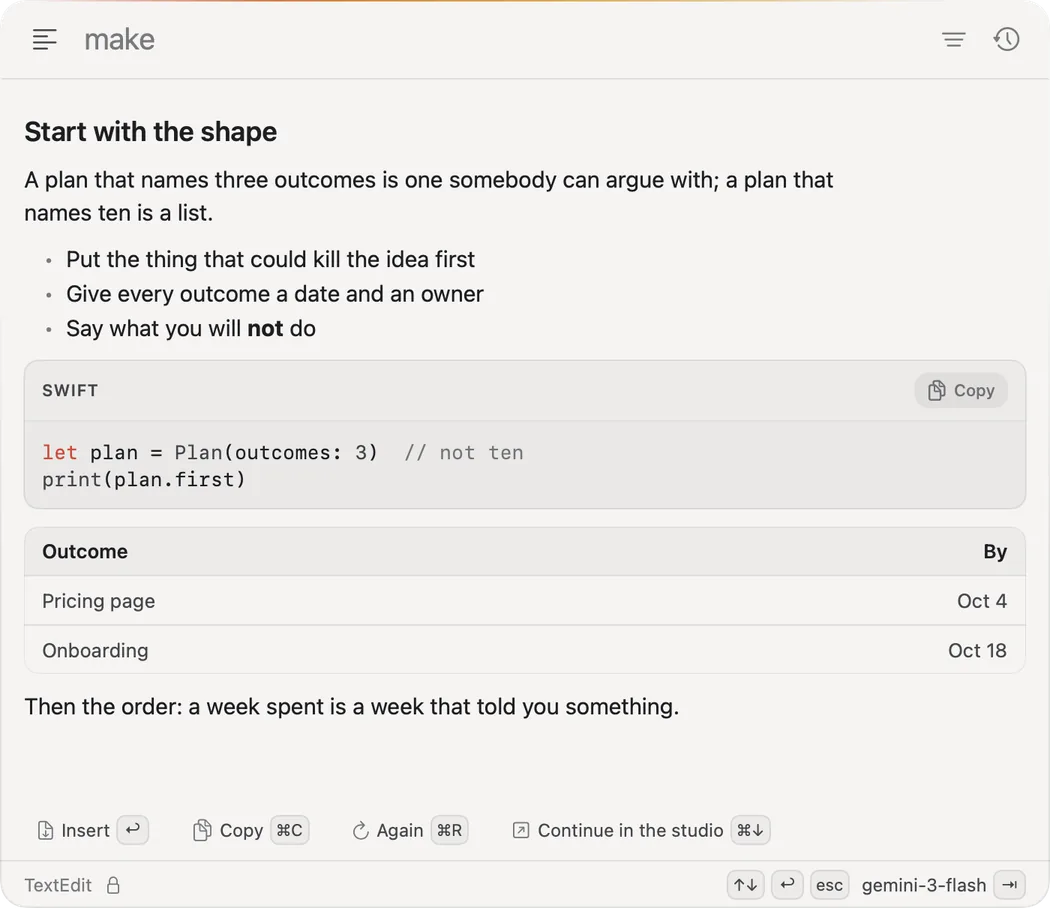
Robin's palette over TextEdit, showing an answer titled Start with the shape: a short plan, a Swift code block with a copy button, and a table of outcomes, with Insert, Copy, Again and Continue in the studio along the bottom.

Work lands on a bench, in apps you own

Each kind of work gets a bench beside the conversation, with its takes and versions kept. The studio says which of your apps Robin can reach — Blender installed, Godot not — and opens each in its own window.

Nothing is installed for you. A missing app is named, with the version Robin needs.

Robin's studio: recent work as thumbnails (a sprite bounce, a walk cycle, a rigged arm), open benches for Picture, Sound, Video, 3D showroom, Sprites and Playable, and other benches listed with their status: Blender installed, Godot and Defold not installed.

It checks before it says done

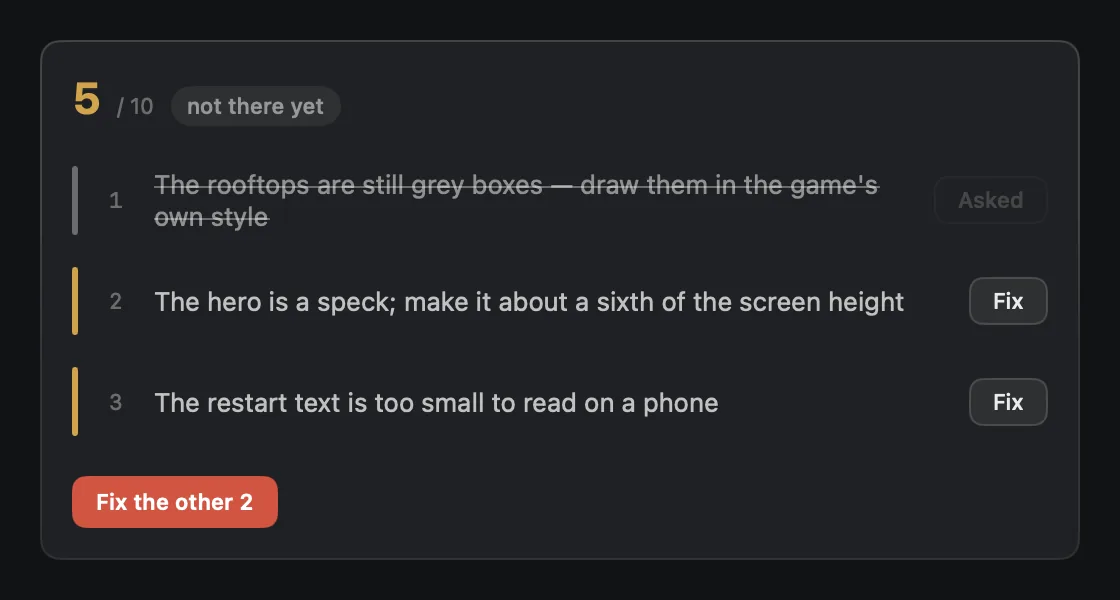
When Robin builds something, it runs it, looks at the first screen and scores it out of ten. Under seven, it says so, lists what is wrong, and leaves the fixes for you to send.

Two caps cannot be argued past: a first tap that moves nothing scores three at most, a screen of placeholder text four.

A review card scoring a game 5 out of 10, marked not there yet, with three findings: the rooftops are still grey boxes (already sent), the hero is a speck, and the restart text is too small to read on a phone, each with a Fix button, and a red button to fix the other two.

It only looks until you let it act

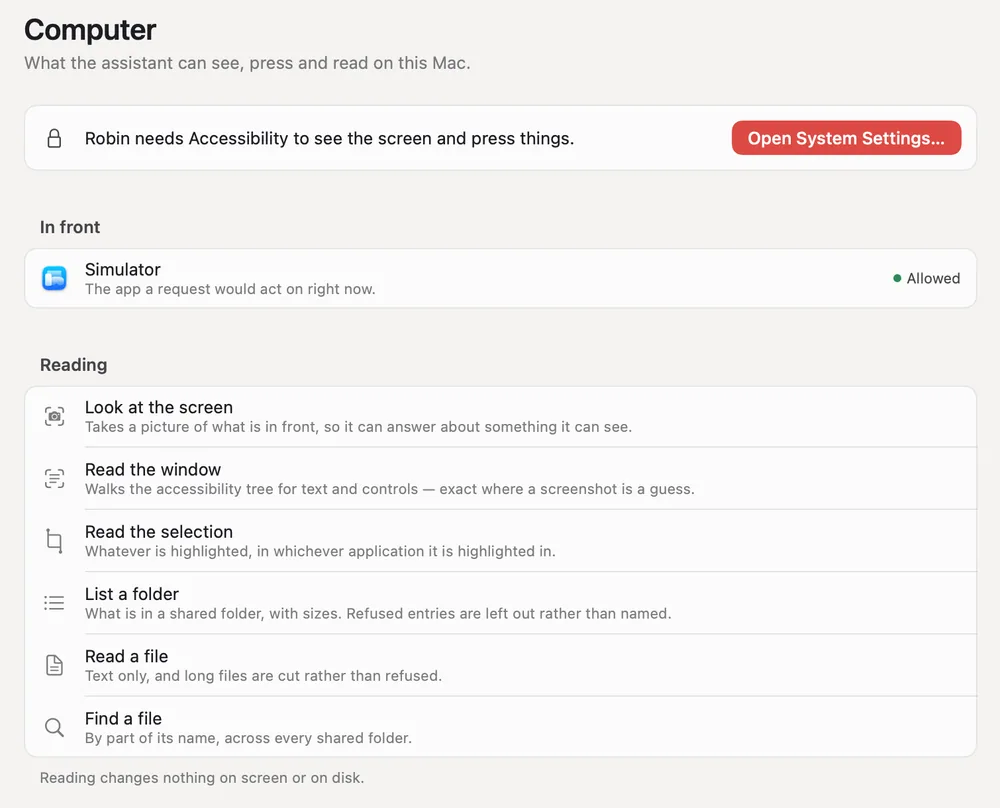
A conversation starts in Look only: Robin can read the screen, the window and the files you shared. Pressing buttons, filling fields and writing files wait until you switch it on, and stay inside the folder you gave it.

Robin's Computer page: what the assistant can see, press and read on this Mac. A notice asks for Accessibility, the app in front is listed as allowed, and a Reading group lists look at the screen, read the window, read the selection, list a folder, read a file and find a file, noting that reading changes nothing on screen or on disk.

Why it is built this way

Four decisions that make it something other than a chat window with plug-ins.

  • It runs on your Mac, with your apps

    On this Mac

    Robin drives the Blender, Unity, Simulator and Chrome you installed, on your files. Nothing is built in someone else’s cloud, and every project is a folder you can open in anything.

  • Any model, with your own key

    In the Keychain

    OpenAI, Anthropic, Gemini, OpenRouter, or a model on this Mac through Ollama, LM Studio or llama.cpp. Keys stay in the macOS Keychain and go only to the provider they belong to.

  • It checks its own work

    Scored out of 10

    A build is booted, photographed and scored before it is called finished. When it falls short, the verdict says so in plain words and lists the fixes.

  • No account, and you pay once

    From $39

    No sign-up, no telemetry, no subscription. A licence covers two Macs and a year of updates, and the version you have keeps working after that.

Your model provider bills you for what you use, at their prices, with nothing added. A local model costs nothing to run, and then nothing leaves the Mac at all.

The benches

A bench is where one kind of work sits beside the conversation, every version kept. These are eight of them, with work on.

  • The sound bench: a waveform with a selection and three takes.
    SoundTakes, a selection, a voice isolated and read back.
  • The pads bench: a four by four grid of pads named Kick, Snare, Hats, Sub bass and more, each with its waveform.
    PadsSixteen pads, sixty-four with scenes, played by you.
  • The video bench: a clip with transport controls, with Add to cut, Narrate, Effect and Export along the top.
    VideoClips, a cut, captions and a voice, one file out.
  • The model bench: a rigged arm on a grid floor, version 2 of 2.
    3D modelMade, rigged, turned and looked at from any side.
  • The sprites bench: a pixel character on a transparent checkerboard, frame 3 of 4.
    SpritesA sheet cut, played, retimed and exported as an atlas.
  • The playable bench: a phone frame showing a game called Rooftop Run with a Play now button.
    PlayableA playable ad, weighed against the network’s size limit.
  • The picture bench: version 3 of 3 of a picture, a green field with a pale sun.
    PictureVersions you can step back through and compare.
  • The board bench: a page titled Audit board, revision 2 of 2.
    BoardA page beside the conversation, revised in place.

And the apps you already have

Robin does not rebuild them. It drives them in their own windows and brings what they make back to a bench.

  • Blender

    Run live

    Through a small add-on Robin installs into your Blender 4.2 or later.

  • Unity

    Run live

    A project made, built and run, with the editor in the pane.

  • Your Chrome

    Run live

    With your own sessions in it, rather than a fresh browser that knows nobody.

  • iPhone Simulator and Android

    Run live

    An app installed, launched and walked by the names of its controls.

  • Any other window

    Tested in parts

    Streamed into the pane, read and clicked by name.

  • Godot, Defold, DaVinci Resolve

    Not yet run live

    Wired up, and not yet run end to end on the Macs we test on.

Robin installs none of these and bundles none of them. Each bench says whether its app is on this Mac.

Pay once

A licence, not a subscription. Buy it, and that version is yours to keep. How the licence works.

Robin

The assistant: the palette over any app, and the conversation, with any model.

$39at launch

$49 after launch

  • One-time purchase, two Macs
  • 12 months of updates
  • Renewal if you want one: $24 a year
  • 14-day refund, no questions

Robin Studio

Everything: every bench, and the apps they drive.

$149founding, at launch

First 500 seats. Then $199.

  • Everything in Robin
  • The benches, Blender, Unity, the simulator and the rest
  • Founding seats: updates for as long as Robin is made
  • 14-day refund, no questions

Team

Five people on Robin Studio, one invoice.

$499at launch

Five seats, two Macs each

  • Five Robin Studio licences, assigned to people
  • 12 months of updates on all of them
  • One receipt, one VAT invoice
  • Keys stay in each person’s Keychain

Nothing is on sale yet; these are the prices at launch. The trial will be the whole app, Studio included, for 14 days with no card. Your model provider bills you directly for what you use, with nothing added here, and a model on your own Mac costs nothing to run.

Questions

When can I get it?

When it is ready to sell and to support, not before. There is no date to promise yet. The list gets one email when there is, with the launch price.

What does it need?

A Mac on macOS 15 or later, and either an API key for OpenAI, Anthropic, Gemini or OpenRouter, or an OpenAI-compatible server such as Ollama or LM Studio. Robin asks for Accessibility so it can read what you select, and Screen Recording only for the benches that stream another app’s window.

Where do my prompts and files go?

To the model provider you chose, with your key, and nowhere else. There is no Robin server to send them to. With a local model, nothing leaves the Mac.

The privacy page lists every host the app can reach, what is sent and when.

Is there a subscription anywhere?

No. Not for the app, not for a cloud tier, not for better models. The only recurring cost is your model provider’s bill, which goes to them, and is nothing with a local model.

Can I try it first?

Yes. The trial is 14 days of the whole app, Studio included, with no card and no account. After buying, you have 14 days to change your mind and get your money back.

What happens when the year of updates ends?

Nothing breaks and nothing switches off. The last version you received keeps working for as long as it runs on your Mac. A discounted renewal buys another year of updates if you want them.

Get early access

One email when Robin is ready to download. We keep your address and the time you joined, nothing else, and you can take it off the list whenever you like. What happens to it.

One email when Robin is ready. Nothing else.